Step 2: Entity Class and Persistence Unit
To store objects in an ObjectDB database using JPA we need to define an entity class:
- Open the [New Java Class] dialog box, e.g. by right clicking the project node
(in the [Package Explorer] window) and selecting New > Class.
- Enter guest as the package name - use exactly that case sensitive package name.
- Enter Guest as the class name - use exactly that case sensitive class name.
- Click Finish to create the new class.
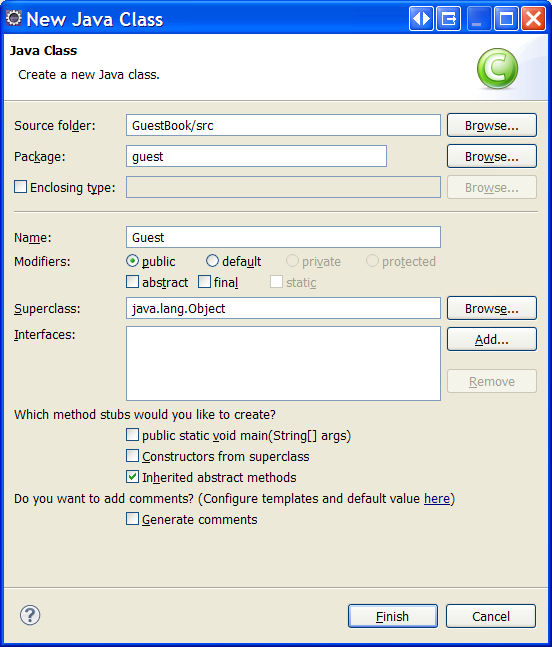
A new class that should represent Guest objects in the database was created in the project (under Java Resources: src > guest).
Use copy and paste to replace the new source file content with the following code:
package guest;

import java.io.Serializable;
import java.sql.Date;
import javax.persistence.Entity;
import javax.persistence.GeneratedValue;
import javax.persistence.Id;

@Entity
public class Guest implements Serializable {
    private static final long serialVersionUID = 1L;

    // Persistent Fields:
    @Id @GeneratedValue
    Long id;
    private String name;
    private Date signingDate;

    // Constructors:
    public Guest() {
    }

    public Guest(String name) {
        this.name = name;
        this.signingDate = new Date(System.currentTimeMillis());
    }

    // String Representation:
    @Override
    public String toString() {
        return name + " (signed on " + signingDate + ")";
    }
}
The Guest entity class will represents guests in the database.
We also need to configure JPA by setting a META-INF/persistence.xml file:
- Open the [New Folder] dialog box, e.g. by right clicking the project node (in the [Project Explorer] window) and selecting New > Folder (or New > Other... > General > Folder and clicking Next).
- Select the project src folder as a parent folder, enter META-INF as a new folder name and click Finish.
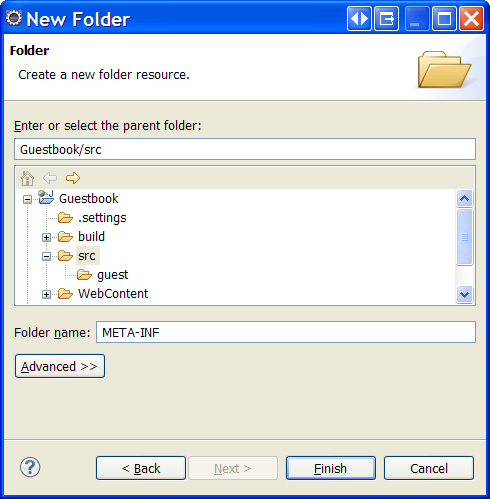
- Right click the new META-INF folder in the [Project Explorer] window, select New > File, enter persistence.xml as file name and click Finish.
- Verify that a new persistence.xml file was created as shown below:
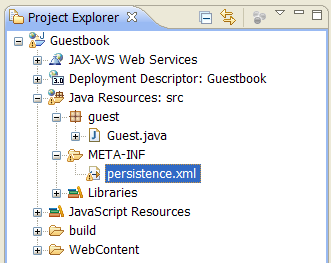
Finally, use copy and paste to copy the following content to the persistence.xml file:
<?xml version="1.0" encoding="UTF-8"?>
<persistence version="2.0" xmlns="http://java.sun.com/xml/ns/persistence"
 xmlns:xsi="http://www.w3.org/2001/XMLSchema-instance"
 xsi:schemaLocation="http://java.sun.com/xml/ns/persistence
 http://java.sun.com/xml/ns/persistence/persistence_2_0.xsd">

  <persistence-unit name="GuestbookPU" transaction-type="JTA">
    <provider>com.objectdb.jpa.Provider</provider>
    <properties>
      <property name="javax.persistence.jdbc.url" value="$objectdb/db/guests.odb"/>
      <property name="javax.persistence.jdbc.user" value="admin"/>
      <property name="javax.persistence.jdbc.password" value="admin"/>
    </properties>
  </persistence-unit>

</persistence>
Now ObjectDB should be used as a JPA provider with the specified database url.
The next step is adding an EJB Session Bean that will manage Guest entity objects.